

 Tutorials
(back to the list of tutorials)
Multi-Agent Algorithm: Interact Method
(requires iGeo version 7.4.0 or higher)
Tutorials
(back to the list of tutorials)
Multi-Agent Algorithm: Interact Method
(requires iGeo version 7.4.0 or higher)
 Define Interact Method
IAgent has another important method "interact(ArrayList
The below is a template to define an interact method.
import processing.opengl.*;
import igeo.*;

void setup(){
  size(480, 360, IG.GL);
  MyAgent agent = new MyAgent();
}

class MyAgent extends IAgent{
  void interact(ArrayList< IDynamics > agents){
    super.interact(agents);
  }

  void update(){
    super.update();
  }
}
The interact method starts with the line
Interact Method Example 1
import processing.opengl.*;
import igeo.*;

void setup(){
  size(480, 360, IG.GL);
  IG.duration(120);
  LineAgent agent =
    new LineAgent(new IVec(0,0,0), new IVec(1,0,0));
}

static class LineAgent extends IAgent{
  static double length = 2;
  static double clearance = 1.99; //less than length

  IVec pt1, pt2;
  boolean isColliding=false;

  LineAgent(IVec pt, IVec dir){
    pt1 = pt;
    pt2 = pt.dup().add(dir.dup().len(length));
  }

  void interact(ArrayList < IDynamics > agents){
    super.interact(agents);
    if(time == 0){ //only in the first time
      for(int i=0; i < agents.size() && !isColliding; i++){
        if(agents.get(i) instanceof LineAgent){
          LineAgent lineAgent =
            (LineAgent)agents.get(i);
          if(lineAgent != this){ //agents include "this"
            // checking clearance of end point
            if(lineAgent.pt2.dist(pt2) < clearance){
              isColliding=true;
            }
          }
        }
      }
    }
  }

  void update(){
    super.update();

    if(isColliding){
      del();
    }
    else if(time == 0){ //if not colliding
      new ICurve(pt1,pt2).clr(0);
      IVec dir = pt2.diff(pt1);

      if(IRandom.percent(40)){ //bend
        new LineAgent(pt2, dir.dup().rot(IG.zaxis, PI/3));
      }
      if(IRandom.percent(40)){ //bend the other way
        new LineAgent(pt2, dir.dup().rot(IG.zaxis, -PI/3));
      }
      if(IRandom.percent(80)){ //straight
        new LineAgent(pt2, dir.dup());
      }
    }
  }
}
In the inteact(ArrayList < IDynamics > agents) method,
there are several unfamiliar operations due to the use of ArrayList.
In the for-loop, the number is counted up to agents.size(),
which is total number of member inside the variable array.
And in the next if-condition
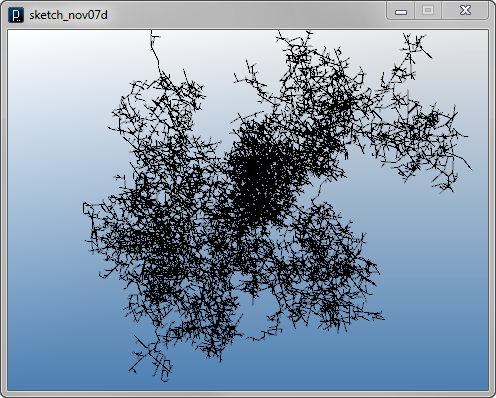
In the algorithm, the interact method is checking collision with all existing LineAgent and in the update method, if it's found to be colliding anything, it delete itself and doesn't create a line. Otherwise, it creates line and 3 child agents in random probability. All of this collision check and geometry and child agents generation is only done once at the time frame of 0 by the if condition "if(time == 0){". The variable "time" is an instance field of IAgent showing how many updating cycles have elapsed since the instance is created.
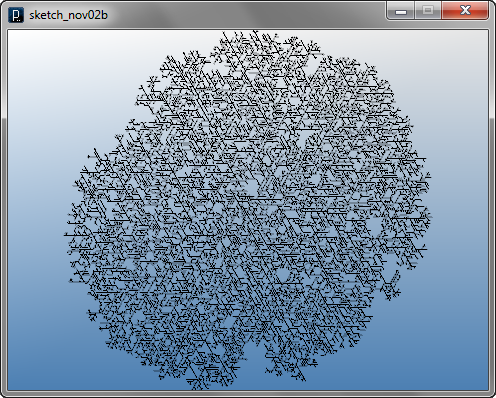
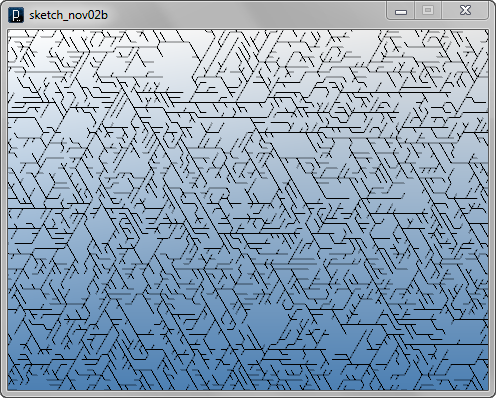
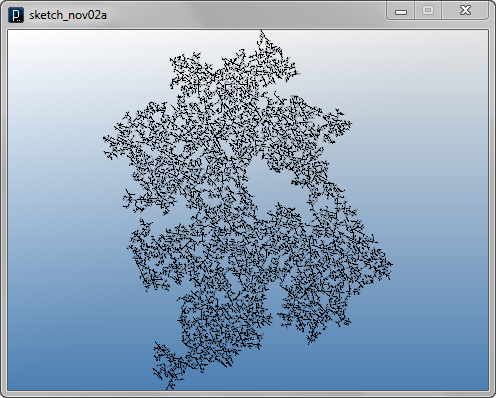
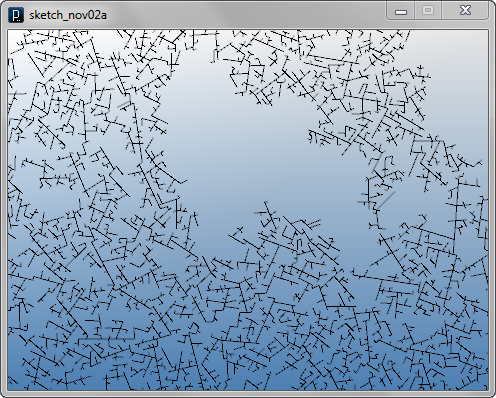
Another code is shown below which is a same line agent code just with branching angle randomized. Please note that the range of random angle of branching is from PI/3 to PI/3*2 because if the angle is less than PI/3, the end point would collide with straight member. Or if the angle is more than PI/3*2, it would collide with the parent line when you have LineAgent.length and LineAgent.clearance close. LineAgent.clearance cannot be larger than LineAgent.length because an agent would judge that the line always collides with the parent line.
import processing.opengl.*;
import igeo.*;

void setup(){
  size(480, 360, IG.GL);
  IG.duration(250);
  LineAgent agent =
    new LineAgent(new IVec(0,0,0), new IVec(1,0,0));
}

static class LineAgent extends IAgent{
  static double length = 2;
  static double clearance = 1.99; //less than length

  IVec pt1, pt2;
  boolean isColliding=false;

  LineAgent(IVec pt, IVec dir){
    pt1 = pt;
    pt2 = pt.dup().add(dir.dup().len(length));
  }

  void interact(ArrayList < IDynamics > agents){
    super.interact(agents);
    if(time == 0){ //only in the first time
      for(int i=0; i < agents.size() && !isColliding; i++){
        if(agents.get(i) instanceof LineAgent){
          LineAgent lineAgent =
            (LineAgent)agents.get(i);
          if(lineAgent != this){ //agents include "this"
            // checking clearance of end point
            if(lineAgent.pt2.dist(pt2) < clearance){
              isColliding=true;
            }
          }
        }
      }
    }
  }

  void update(){
    super.update();

    if(isColliding){
      del();
    }
    else if(time == 0){ //if not colliding
      new ICurve(pt1,pt2).clr(0);
      IVec dir = pt2.diff(pt1);

      if(IRandom.percent(40)){ //bend
        new LineAgent(pt2, dir.dup().rot(IG.zaxis,
          IRandom.get(PI/3,PI/3*2)));
      }
      if(IRandom.percent(40)){ //bend the other way
        new LineAgent(pt2, dir.dup().rot(IG.zaxis,
         -IRandom.get(PI/3,PI/3*2)));
      }
      if(IRandom.percent(80)){ //straight
        new LineAgent(pt2, dir.dup());
      }
    }
  }
}
Interact Method Example 2
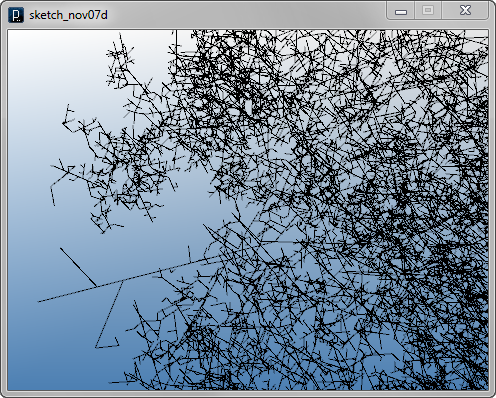
The following code is the 3 dimensional version of the last code. Tha algorithm is changed only inside update() method replacing the rotation axis from z axis to a random direction vector.
import processing.opengl.*;
import igeo.*;

void setup(){
  size(480, 360, IG.GL);
  IG.duration(150);
  new LineAgent(new IVec(0,0,0), new IVec(1,0,0));
}

static class LineAgent extends IAgent{
  static double length = 2;
  static double clearance = 1.99; //less than length

  IVec pt1, pt2;
  boolean isColliding=false;

  LineAgent(IVec pt, IVec dir){
    pt1 = pt;
    pt2 = pt.dup().add(dir.dup().len(length));
  }

  void interact(ArrayList < IDynamics > agents){
    super.interact(agents);
    if(time == 0){ //only in the first time
      for(int i=0; i < agents.size() && !isColliding; i++){
        if(agents.get(i) instanceof LineAgent){
          LineAgent lineAgent =
            (LineAgent)agents.get(i);
          if(lineAgent != this){ //agents include "this"
            // checking clearance of end point
            if(lineAgent.pt2.dist(pt2) < clearance){
              isColliding=true;
            }
          }
        }
      }
    }
  }

  void update(){
    super.update();

    if(isColliding){
      del();
    }
    else if(time == 0){ //if not colliding
      new ICurve(pt1,pt2).clr(0);
      IVec dir = pt2.diff(pt1);

      //rotation axis with random direction
      IVec axis = IRandom.pt(-1,1).len(1);

      if(IRandom.percent(50)){ //bend
        new LineAgent(pt2, dir.dup().rot(axis,
          IRandom.get(PI/3,PI/3*2)));
      }
      if(IRandom.percent(50)){ //bend the other way
        new LineAgent(pt2, dir.dup().rot(axis,
         -IRandom.get(PI/3,PI/3*2)));
      }
      if(IRandom.percent(80)){ //straight
        new LineAgent(pt2, dir.dup());
      }
    }
  }
}
Interact Method Example 3
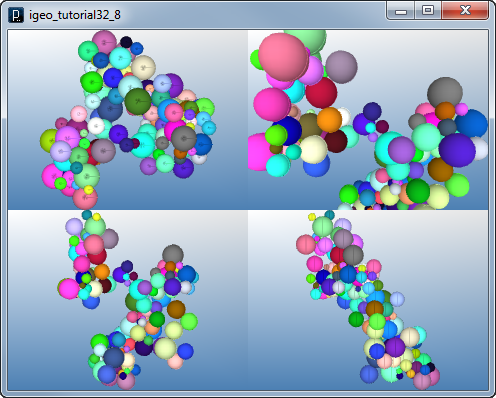
This example below shows an algorithm to solve overlap of spheres. The interact method checks all other spheres if any of them has overlap with the current sphere and if it does, the current sphere moves itself to the location where it just touches the other sphere.
import processing.opengl.*;
import igeo.*;

void setup(){
  size(480,360,IG.GL);
  IG.duration(400);
  new MySphereAgent(IRandom.pt(-10,10),IRandom.get(5,20));
  new MySphereAgent(IRandom.pt(-10,10),IRandom.get(5,20));
  IG.fill();
}

class MySphereAgent extends IAgent{
  IVec pos;
  double radius;
  ISphere sphere;
  boolean changed=true;

  MySphereAgent(IVec p, double rad){
    pos = p;
    radius = rad;
  }

  void interact(ArrayList< IDynamics > agents){
    super.interact(agents);

    for(int i=0; i < agents.size(); i++){
      if(agents.get(i) instanceof MySphereAgent){
        MySphereAgent sa = (MySphereAgent)agents.get(i);
        if(sa != this){
          double dist = sa.pos.dist(pos);
          if(dist < radius+sa.radius){
            IVec diff = pos.diff(sa.pos);
	    //amount of overlap is this radius plus other radius minus distance between two centers
            diff.len(radius+sa.radius-dist);
            pos.add(diff); //only this agent is moved, not others
            changed=true; //state variable is updated
          }
        }
      }
    }
  }

  void update(){
    super.update();

    if(changed){
      // update sphere
      if(sphere!=null) sphere.del(); //shpere is null first
      sphere = new ISphere(pos, radius).clr(clr());
      changed=false;
    }
    if(time==5){ //delayed to create the next agent til time==5
      // next agent's direction
      IVec dir = IRandom.pt(-1, 1);
      double nextRadius = IRandom.get(5, 20);
      // amount of move is the current radius + the next one
      dir.len(radius+nextRadius);
      new MySphereAgent(pos.cp(dir),nextRadius).clr(IRandom.clr());
    }
  }
}
Interact Method Example 4
The below shows another example of use of interact method. This interact method checks collision with other rectangles and if it collides on the right side or top side (in y direction) it shrinks the size. The left side and bottom side is not checked but other agent will check when it's on on the left or the bottom. Because the agent is checking the collision all the time, it's not deleted at the update method unless the shrunk size gets too small.
import processing.opengl.*;
import igeo.*;

void setup() {
  size(480, 360, IG.GL);
  IG.duration(500);
  int num=20;
  for (int i=0; i < num; i++) {
    new RectAgent(IRandom.pt(-100,-100, 0,100,100, 0),
                  20, 20).clr(IRandom.clr());
  }
}

static class RectAgent extends IAgent {
  static double gap = 1.0;
  static double minSize = 1.0;
  static double maxSize = 20.0;

  IVec pos;
  double width, height;
  boolean anyChange=true;
  ISurface rect;

  RectAgent(IVec pt, double w, double h) {
    pos = pt;
    width=w;
    height=h;
  }

  void interact(ArrayList < IDynamics > agents) {
    super.interact(agents);
    // shrink the size when it collides with others.
    for (int i=0; i < agents.size(); i++) {
      if (agents.get(i) instanceof RectAgent) {
        RectAgent ra = (RectAgent) agents.get(i);
        if (ra != this) {
          // is it overlapping?
          if (ra.pos.x+ra.width+gap > pos.x &&
              ra.pos.x < pos.x + width+gap &&
              ra.pos.y+ra.height+gap > pos.y &&
              ra.pos.y < pos.y + height+gap) {
            // both x and y overlapping?
            if (ra.pos.x >= pos.x && ra.pos.y >= pos.y) {
              if ( ra.pos.x - pos.x > ra.pos.y - pos.y ) {
                width = ra.pos.x - pos.x - gap;
              }
              else {
                height = ra.pos.y - pos.y - gap;
              }
              anyChange = true;
            }
	    // x is right of pos
            else if (ra.pos.x > pos.x) {
              width = ra.pos.x - pos.x - gap;
              anyChange = true;
            }
	    // y is top of pos
            else if (ra.pos.y > pos.y) {
              height = ra.pos.y - pos.y - gap;
              anyChange = true;
            }
          }
        }
      }
    }
  }

  void update() {
    super.update();
    // update geometry only when the size changes
    if (anyChange) {
      if (rect != null) rect.del();
      if (width >= minSize && height >= minSize) {
        rect = IG.plane(pos, width, height).clr(clr());
      }
      // if too small, removed
      else { del(); }
      anyChange=false;
    }
    if (time==0) {
      new RectAgent(pos.cp(IRandom.pt(-10,-10, 0,10,10, 0)),
        IRandom.get(minSize,maxSize),
        IRandom.get(minSize,maxSize)).clr(clr());
    }
  }
}

Interact Method Example 5
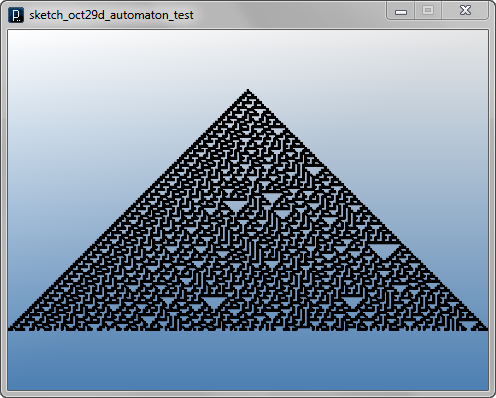
The following code implements a simple cellular automaton algorithm using the interact method to define the state transition rules. This is one dimensional array of cellular automata and automata move down creating boxes if the state is 1 and also creating new automata on the side. For more information about cellular automata algorithm, please see the wikipedia page of cellular automaton.
import processing.opengl.*;
import igeo.*;

void setup() {
  size(480, 360, IG.GL);
  IG.duration(100);
  new MyAutomaton(new IVec(0, 0, 0));
}

static class MyAutomaton extends IAgent {
  static double size = 10;
  IVec pos;
  int state = 1;
  int nextState;
  MyAutomaton leftAgent=null, rightAgent=null;

  MyAutomaton(IVec p) { pos = p; }

  void interact(ArrayList < IDynamics > objects){
    MyAutomaton left=null, right=null;
    int leftState=0, rightState=0;
    //searching left and right automaton
    //if not found leftState & rightState are zero
    for(int i=0; i < objects.size(); i++){
      if(objects.get(i) instanceof MyAutomaton){
        MyAutomaton agent = (MyAutomaton)objects.get(i);
        if(agent != this){
          if(agent.pos.eqX(pos.dup().sub(size,0,0))){
            left = agent;
            leftState = left.state;
          }
          else if(agent.pos.eqX(pos.dup().add(size,0,0))){
            right = agent;
            rightState = right.state;
          }
        }
      }
    }
    // state transition table
    if (leftState==0 && state==0 && rightState==0) {
      nextState = 0;
    }
    else if (leftState==0 && state==0 && rightState==1) {
      nextState = 1;
    }
    else if (leftState==0 && state==1 && rightState==0) {
      nextState = 1;
    }
    else if (leftState==0 && state==1 && rightState==1) {
      nextState = 1;
    }
    else if (leftState==1 && state==0 && rightState==0) {
      nextState = 1;
    }
    else if (leftState==1 && state==0 && rightState==1) {
      nextState = 0;
    }
    else if (leftState==1 && state==1 && rightState==0) {
      nextState = 0;
    }
    else if (leftState==1 && state==1 && rightState==1) {
      nextState = 0;
    }
    //move down
    pos.add(0,-size,0);
    //new automaton
    if(left==null){
      new MyAutomaton(pos.dup().sub(size,0,0));
    }
    if(right==null){
      new MyAutomaton(pos.dup().add(size,0,0));
    }
  }

  void update() {
    super.update();
    // when state==1, put a box, otherwise no box
    if(state == 1){
      new IBox(pos.dup(), size, size, size).clr(0);
    }
    state = nextState;
  }
}

HOME
FOR PROCESSING
DOWNLOAD
DOCUMENTS
TUTORIALS
GALLERY
SOURCE CODE(GitHub)
ABOUT
